Why Typing Stays Fast Even as Documents Grow Longer
Any editor is fast for short notes. The difference emerges as documents get longer, and that difference comes down to whether the cost of a single keystroke follows the size of the edit or the size of the document.
Short notes are fast in any editor. The difference becomes apparent when documents get longer.
If the entire document is reread and the screen is laid out again every time you press a key, input gets slower as the document gets longer. That is why an editor that felt fine with a ten-line note becomes frustrating with a two-thousand-line design document.
mori did not see this problem as a performance issue to fix later. It established it as a design principle to uphold from the beginning.
When editing, reread and lay out only the changed range. Reread the entire document only when opening a file.
Reread Only What Changed
In Markdown, an earlier line can change the meaning of later lines. If you open a code block near the top of a document, everything below it can become code, and the same sentence is interpreted differently inside a list or blockquote.
So mori remembers “safe points” where the effects of what came before have definitely ended. When an edit occurs, it starts reading from a nearby safe point and stops the moment the content becomes stable again.
It does not reread the blocks after that. If lines were added or removed, it only shifts their positions. This makes the cost follow the range that actually changed rather than the entire document.
The parser follows CommonMark’s line-by-line algorithm and passes all 652 spec tests. But incremental processing can silently produce incorrect results. So after applying 3,600 random edits to random documents, it compares the result after every edit with the result of rereading the entire document.
This test found a real bug, too. It occurred when a safe point and the edited line overlapped exactly.
Performance Principles Are Enforced by Tests
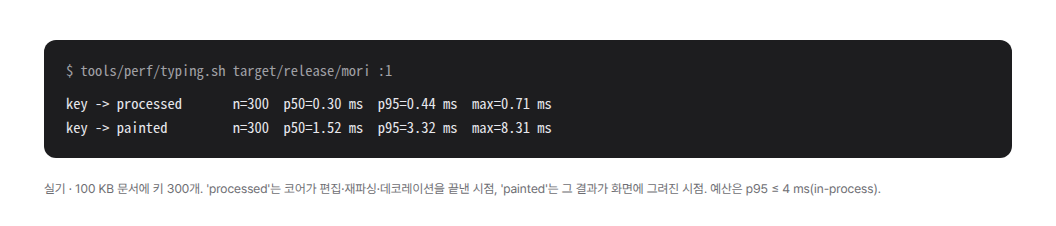
The target is p95 4 ms from pressing a key until core processing finishes. If this limit is exceeded, it is treated as a bug, not as an improvement task.
The rules are not merely written down in documentation. Automated checks verify that full reparsing is used only when opening a file. They also prevent recurring timers or frame work while idle.
Performance is not judged by eye, either. The harness enters keystrokes into the actual screen and measures the distribution of processing times. It looks at p95 instead of the average or median. That is because what frustrates users is not the usual speed, but the occasional long delay.
The same fixed document is always used for measurement.
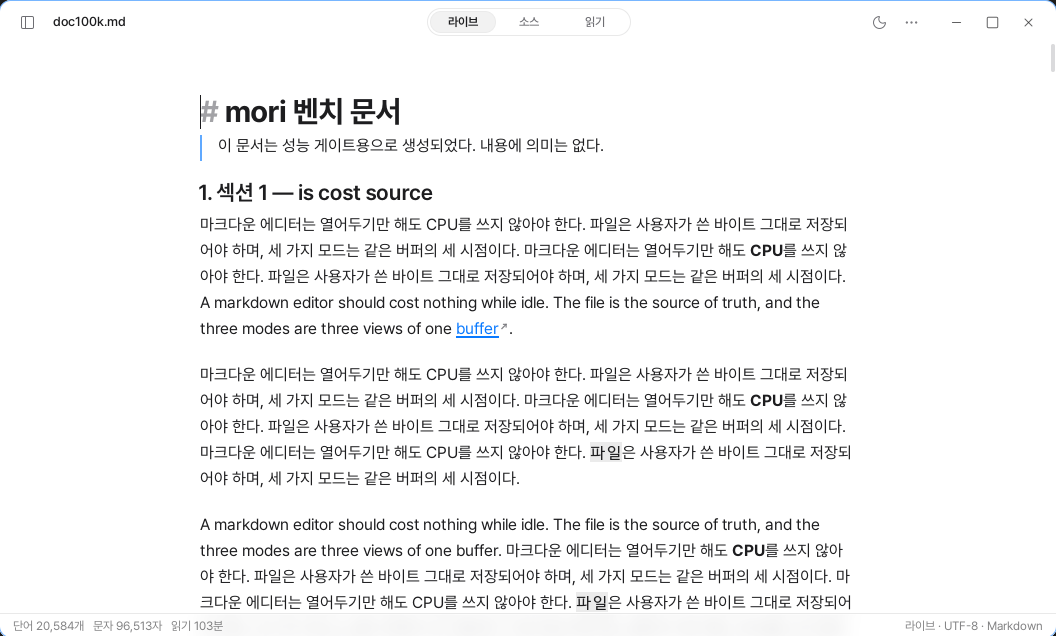
doc100k.md used by the harness, opened in live mode. The status line shows 96,513 characters and a reading time of 103 minutes.Change Only as Much of the Screen as Necessary
Making only the parser incremental was not enough.
Syntax highlighting for code blocks was reprocessing every block after each edit. Regardless of the size of the edit, it was the last remaining task that became slower as the document grew longer.
Now the syntax highlighting of unmodified blocks is reused as is. Blocks after the edit are only shifted by the change in the number of lines.
Blocks outside the viewport are not laid out. This is because both the range that is reread and the range that is redrawn must be reduced to maintain speed in long documents.
There Are Exceptions
Sometimes the entire document has to be processed again.
This happens when a file is opened or when the line-ending format changes. Editing a link reference definition can change any link anywhere in the document, so the screen update range is expanded to the entire document as well.
Even if the core is fast, the screen still needs time to wait for the next frame. On a 60Hz display, the frame interval itself becomes a limit. So the core processing time and the time until the result actually appears on the screen are measured separately, and the two figures are not placed on the same axis. That is why the two lines on the cover are different.
A fast editor is not an editor that does everything quickly.
It is an editor that does not do work that does not need to be done.